Monday, January 23, 2017

Campbell Technology Night


Campbell Elementary has held a Family Technology Night for the past two years. The technology and family engagement committees work together with our administrator to design a night filled with events that allow parents to see how students are using technology for learning. In this video, I will use the Knowledge Loom Model to examine the elements of technology integration represented at Family Technology Night.

Fliers advertising this event were sent home one week in advance and reminders were sent the day before the event. We hoped that advertising, prizes, Husker football players, and free pizza would encourage many students to attend.

At the front door, families received a passport with each of the sessions listed. Signs were placed throughout the building to guide families to each session. Our principal tweeted about this fun night, and families were able to see pictures.

While families enjoyed pizza, students acted in digital citizenship skits. These skits highlighted the important ethical and legal issues related to technology use.

A librarian from the Lincoln City Libraries attended and shared resources with our families. Families were taught about the many resources available at the library, including access to the internet. This helped improve technology access for our students. 

UNL football players attended and read books to the students to stress the importance of reading and hard work. They also shared how they use technology to learn.

Our computer science teacher showed families some of the programs used to teach students how to code. Students also had fun programming robots.

In this session, families were taught how to use web resources from the Campbell Website. This helped ensure that all families had access to resources. Families also had to opportunity to see Math Career Research and Personal Narratives created using Google Classroom. These projects showed examples of purposeful integration of technology.

In the chromebooks session, students shared how they use their chromebooks to learn, another example of purposeful integration. They showed parents how they log into google classroom and shared their work. In addition, students showed how they use the chromebooks for assessments. These assessments help teachers to evaluate their practices and seek out ways to improve.

At the end of the night, students entered their passport cards into a drawing. Students won lost in fun gift packages, Saltdogs tickets, and prize bags from CVS. The prizes for students and donations from area organizations both helped build community relationships.

Our students and families are the reason that we hold family technology night. As I recall students’ excitement that night, it reminds me why we do the hard work that we do. Our students and families deserve it, and it is a privilege to be a part of this process. I believe that this night was a success, due to careful planning. As a result of planning and collaboration, many of the components of the Knowledge Loom Model were present in this family engagement activity.

As Campbell continues to develop in Educational Technology implementation, some areas that we are working on include vision, planning, support, and professional development. Our technology coach and Computer Science teacher have worked closely with administration to refine our vision, planning, and professional development. Teachers have received ample support from administration. I look forward to continuing to lead this process at Campbell, and can’t wait for our next family technology night.

Saturday, January 21, 2017

#InnovatorsMindset


Reading The Innovator's Mindset by George Couros has been transformational to my teaching practice.  Although I have focused on technology integration for some time now, I have not consistently used one philosophy to guide my instructional decisions.  This book has given me the tools I need to create a culture of digital citizens that know how to change the world for the better.  Many of the things I have read have reaffirmed the decisions that I have made for myself and my students.  Through twitter chats, google hangouts, following blogs, and collaborative classroom projects, I have helped myself and my students become more connected.  I have also continued to work on my own blog as a way to reflect about my teaching and learning.  It is encouraging that I have been on the right track in many ways, but it is also exciting to think about how my practice is changing as a result of this book.

As I have worked on technology integration in my classroom, it has been a gradual process.  Each year I have implemented more bits and pieces, but I still haven't felt a complete culture shift in my classroom.  I am excited to implement the principles from this book, and I believe that I will finally see the culture shift that I have been wanting for the past few years.  Currently, I am on a leave of absence from second grade and am supervising UNL practicum students.  One of the most important messages in this book is to put myself in the shoes of my learners.  What would I want if I were in their position?  I have started to ask myself this question each day and I believe this will be an important piece of the culture shift in my classroom.  As I have asked myself what I would want as a learner, I have been able to rethink how I had planned to do things this semester with the practicum students.  Using Couros' "8 Things to Look for in Today's Classroom" graphic, I have identified the following areas in my current teaching practice:

-Reflections after teaching (time for reflection, self-assessment)
-Feedback from CT and peer (critical thinkers, connected learning, voice)
-Sharing great ideas from students G+ community and taking pictures (connected learning, voice)
-Focus on their strengths during feedback (choice)
-Journals in G+ community so peers can share feedback (time for reflection, critical thinkers, connected learning, voice)
-Allowing students to substitute a twitter chat for one of their journals (choice, connected learning)
-Building relationships with CT's and sharing their ideas (connected learning)
-Seminar #2 having an e-learning day where students can choose from a few different webinars, then will work with groups to create a presentation (using choice of tech tool) that will be shared in G+ community (choice, problem solvers/finders, opportunities for innovation)
-Seminar #3 share videos in stations where they can ask questions/provide feedback and get out early when all students have shared (voice, critical thinkers, connected learning)

It has been exciting to see immediate effects as a result of the changes I have made for this group of practicum students.  They are eager to learn from each other and have provided each other with support and ideas that would not have happened without opportunities to give each other feedback.  As students come up with new ideas, I am able to share them with the other students, and the culture of our group continues to grow as ideas transform into new ideas.  One pair of students chose to co-teach their first math lesson together and it was skillfully executed.  I shared their work with the class, and have encouraged other students to co-teach if it would work well for them.  Hopefully this and other ideas will push the students to innovate the ways that they are teaching.

Rather than be held back by my areas of weakness, I need to focus on my strengths and push myself to keep learning. As I learn through collaboration with other teachers, I can build on their ideas and discover new ways to inspire my students. I also need to give my students opportunities to share their strengths and interests with me, so I can find new ways to help them learn. One thing that was transformational for me in this book was the video, “Obvious to you. Amazing to others.” It seems fitting that this was not even one of Couros’ ideas, but something important that he decided to share. This video reminds me that my students and I have important ideas to share with the world, and even those that seem commonplace to me have the potential to change someone else’s story.  In location 3041, Couros challenges his readers, “Stories can become the fuel to innovation in education. I hope you’ll share yours.”

Before reading this book, I was familiar with many of the key ideas in it, but I was piecing my learning plan together. I was having my students collaborate, problem solve, share their work, and play with technology tools, but my planning wasn’t rooted in a framework. The Innovator’s Mindset has given me the right questions to ask to guide my decisions as I choose a path for learning. I have started to understand how my learning and my students’ learning are intertwined with each other in a collaborative relationship. I have learned to ask myself if I would want to be a learner in my own classroom. I have also learned the importance of fighting for each student to have opportunities to shine and share their strengths with the world. When students have a chance to share their strengths with others, they begin to see themselves as part of a larger whole, and can become citizens that have the tools needed to help others. Their stories deserve to be told, and the world will be a better place because of it.


Sunday, May 1, 2016

Teac 880a Reflection


As I reflect on the past semester, a few areas of growth stand out to me. More than anything, this class gave me the push that I needed to take risks with technology that could enhance instruction and productivity in my classroom. Being able to take these risks helped me as I continue to have less inhibitions for presenting “perfect” projects of students work. This class also created a community of learners that had a similar focus. As I continue to complete independent PD, I have learned the importance of having a supportive PLN where I can ask questions and hear the perspectives of others. Finally, this class provided me with two types of resources. First, I learned about many ways to follow others and gain resources about my areas of interests. Second, I was able to create my own resources that could be shared and used by others.

Although learning how to use new technology is a passion of mine, this course helped me to stay focused and involved in seeking out resources on a daily basis. Each project was a new opportunity for me to take a new risk and create products that could be useful in my classroom. I have continued to focus more on the process of learning, and less on a perfect end product.

Over the past two years, I have been working to develop a PLN where I have the opportunity to be challenged, provide ideas for others, and think deeply about important issues in education. I am so thankful for this class, because it did exactly that. I have made some great friends and I am excited to continue dialoguing with others in this community. Sometimes when I have participated in twitter chats, I have gotten a bit overwhelmed. This smaller community made it a lot more realistic to develop more focused conversations that relate to legitimate questions and challenges in the classroom.

Last, this class gave me some great tools for finding resources that I need. Many of the posts shared in this class have helped me to find great new people to follow. I have also learned how to use twitter hashtags and chats to keep up with specific areas of interest. In addition to gaining some great resources, I have learned how to create my own resources. One of my goals over the next year is to find ways to build my web presence through sharing my resources. I have learned how to make my own youtube videos, screencasts, and presentations and share them through social media. Learning to do these things has also encouraged me to think about how I could allow my students to create and share their products and use social media to share. I am excited to teach my students how to interact with each other online using google classroom or schoology, then move to school-wide communication, then share out with the community. Students will need some guidance, but ultimately they each have a voice and need an opportunity to share their thoughts and opinions as they learn.

Saturday, March 19, 2016


I now get asked daily if we are going to do a new breakout.  My students have LOVED our first breakout edu game, Custodian Games.  Here is a quick video of them having a blast! A few tips I would share for future breakout games:
1. Explain the different types of locks before starting if students haven't played Breakout EDU before.
2. Encourage teamwork and set the expectation that everyone should be helpful to each other, or the game won't work.
3. Each student can use a worksheet to show that everyone is participating. The worksheet provides space for work and to write the codes.
4. Set a procedure for how students will show that they are ready to try a lock. It is important that students have actually worked to find an idea for their code, even if it isn't correct.
5. Step back and let the students do the thinking! This is the hardest for me!
6. At the end, spend time reflecting on the experience with students. What went well? What was challenging? What ideas do students have for next time?

Sunday, February 28, 2016

Google Docs Tips

Google Docs Tips

Tip 1: Type with your voice
Open document or create new
Put cursor where you want to type
Go to tools>voice typing
Click the microphone icon and say what you want to type
Click the microphone icon again when you are done talking

Tip 2: Share a PDF version of your document
Select document in drive
Push share button
Click “get shareable link”
Paste the link, but change the end of the link as follows
Before: http://docs.google.com/document/d/12345678/edit?usp=sharing
After: http://docs.google.com/document/d/12345678/export?format=pdf
Send the link that has been modified

Tip 3: Translate docs into a different language
Click tools>translate
Rename translated document and choose language

Tip 4: Insert an image
Click insert>image
Click the search tab
Search for desired picture
Select

Tip 5: Access google docs and edit from your phone or tablet
Download google docs from the app store
Make sure you are logged into your google account on your device
Open and edit any document


Increase Productivity in Google Slides


Saturday, February 13, 2016

NETA Judging Reflections

Last Saturday, I had the opportunity to participate as a guest judge for NETA contests with the NETA board.  Each person that I met was incredibly welcoming and both open and respectful while listening to ideas.  It was an honor to have the chance to experience productive struggle with many of my personal celebrities as we judged a broad variety of grant and contest submissions.  I left with many take-aways, and after a week of reflection, will attempt to explain my thoughts.

I began on a committee that was judging teacher submissions for NETA Grants.  As someone who has considered submitting my own grant, this was a unique opportunity.  In this category, there were many well-planned submissions, so our committee found it difficult to narrow it down to three winners.  One thing that stood out about the winners was that their projects utilized networking across districts, ages, and countries.  Not only did the projects connect to state standards, they provided the chance for students to grow into digital citizens as they participated in the projects.  I am excited to follow these teachers and watch for their results next year at NETA. 

After judging a wide variety of interactive media and still images from students from K-12, I found that I was left with a few questions.  Although there were some categories that had many strong submissions, there were others that had few submissions and some that did not fit the criteria for judging.  I continue to wonder about the underlying reasons for the lack of submissions.  It is possible that teachers are unaware of the contests or some categories are not as relevant with current technology and state standards, but I wonder if there are larger underlying reasons.  

As a classroom teacher who has not submitted student work, my main reason is fear that my students' work is not high enough quality.  I have many digital student products, but I am not confident submitting most into contests.  Any time I complete digital projects with students, I feel that we are on a time crunch to get back to the "real" work of prepping for assessments.  As a result, our projects do not typically receive the time, feedback from a diverse audience, or polishing that I feel they deserve.  Maybe I am over-complicating things and I just need to be brave and submit work, but this is where I am at right now.  I wonder if other teachers struggle with the same problem as they navigate the ever-changing balancing act of achieving favorable test results and providing real learning opportunities for students, where individuals can shine. 

My final observation after judging with the NETA board is how inspired I felt after a few hours of interaction with like-minded professionals.  I left feeling recharged and excited about my role as a teacher.  The NETA board members are passionate about education and are not afraid to push themselves and others outside of their comfort zones to do what is best for students--to participate in giving students the tools and authentic opportunities they need to become responsible digital citizens that possess an understanding of how to use technology to make the world a better place to live.  With this goal in mind, I have spent the past week working on projects, researching, and participating in twitter chats.  I am more determined than ever to take advantage of my role as a teacher leader in the area of educational technology, and can't wait to see what the next few months hold as I continue this process.

If you are a teacher and have considered submitting a NETA grant or student contest, here are a few tips that I would share:

NETA Grants
*Research the technology that you are requesting
*Clearly explain the timeline and budget and include links to applicable websites
*Narrow down your topic and make a well-defined request
*Choose a project that is unique and could truly be enhanced with the requested technology 
*Think big picture: How will your project impact students now and in the future?
*Bonus: Find ways to collaborate between grade levels, schools, or districts

NETA Contests
*Choose 1-3 of your best student projects to submit
*Find a contest category that best fits your student-created projects
*Submit projects that show depth of learning
*Share NETA contests with your colleagues to increase awareness!
*Submit!

Sunday, February 7, 2016

Create a Google Classroom and Assign Work


This is a brief tutorial on how to start your own google classroom and create assignments.  If your school district has an easy way to invite students, you can select a class that has been shared with you and click invite.  If not, no worries!  Your students just need to log in and have access to your class code.  Once you understand the basics, creating assignments is very simple.  

Sunday, January 24, 2016

How I have used Padlet in my Classroom


Padlet is a virtual whiteboard website where students can each post their own sticky notes to collaborate.  In this video, I share a few of the ways that I have customized Padlets to activate prior knowledge, share learning, or use a RAN chart throughout a unit of study.

Monday, January 18, 2016

Chrome and Chrome Extensions

Prior to this activity, I had some basic exposure to Youtube extensions at NETA in 2015, but had only used screencastify a handful of times. In the past I have found the chrome app store overwhelming, and have avoided the use of apps and extensions. This project gave me the little push to seek out a few extensions at a time in order to increase my daily productivity.

Wednesday, April 29, 2015

Share the Buzz

I hope that you know what I'm talking about, because I wish that every teacher could hear the buzz on a regular basis.  It is why I go to work every day.  One of my favorite things about the collaborative projects that I have completed this year is listening to the buzz that my students make when they're really REALLY excited about their learning.  It's that quiet chatter of excitement mingled with laughter and awe as students collaborate and work on a project together.

This semester one of my goals has been to share my students' writing digitally.  During third quarter, students wrote research reports and published them on Storyjumper.  They were able to share their digital stories with parents during our research author celebration.

In addition to sharing our research with parents, we were able to share it with third graders digitally.  Sara Tracy and Angie Zulkoski had their students log into Storyjumper using my teacher account and make comments on my students' work using two stars and a wish.  Here are some of the comments that we got:
  • Work on spelling.But I liked the bolded words keegan
  • I liked your book those rattlesnakes and it was cool book by sajad
  • I like that you put a lot of detils.But you need to put puncshuion.
For fourth quarter, my students published their Explanatory writing using Puppet EDU.  Once I had the links, I organized them in a symbaloo to make it easy to collaborate with others.  My students were able to share their work with many parents on our Campbell Technology night.  After viewing students' videos, parents and students left sticky notes with feedback on the published research.  The next day, my students also got to share their Puppet EDU videos live with a 4th grade class.

Today my students got to experience the other side of collaboration.  They got to be the audience.  I put students in groups of two and they logged onto Sara Tracy's third grade Storyjumper account.  Before I had students comment, I explained that I wanted them to include their name and a star.  We reviewed the sentence stems for giving a star for writing.  I wish you could have been in my classroom to hear the buzz as my students read the third grader's fractured fairytales together.  Since you weren't there, I have posted some of my student's comments below.

My new personal challenge is to provide meaningful activities to create that buzz in my classroom.  Have you heard the buzz lately?  In what ways have you used collaboration to enhance learning in your classroom?  


Saturday, April 25, 2015

NETA 2015 Engaging Elementary Students with Augmented Reality Apps


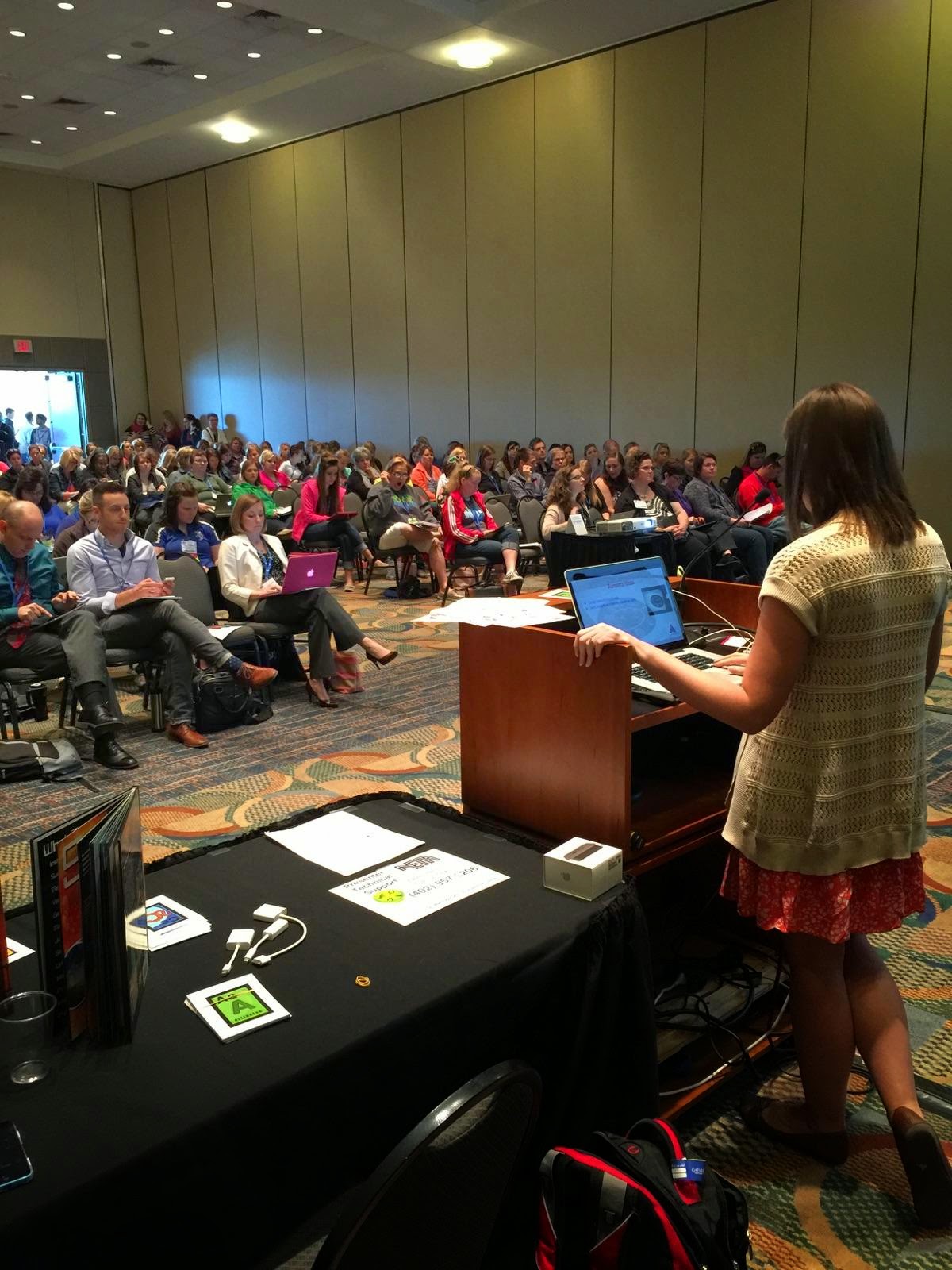
Although technology (specifically the wifi) did not work in our favor during our presentation, I enjoyed my first NETA presentation.  I hope that I was able to share ideas that would be useful to other classroom teachers.  Our presentation (link below) includes ideas for using Augmented Reality Apps with iPads in the classroom.   I was able to share how I have watched my classroom come alive through the use of Aurasma in combination with Chatterpix, Tellagami, and Puppet EDU.  My students can open a book and use Aurasma to view a video that they have created to connect their learning to the curriculum.  
It meant a lot to know that my friends and teachers came to support us as well.  Their support was a glimpse of the way teachers can encourage and challenge each other as a part of a Professional Learning Network. I am excited to share my new learning with my PLN and colleagues and hopefully inspire others to be the change that our students need!


Monday, April 20, 2015

Technology Integration...Lessons Taught and Lessons Learned

Seven months ago, I wrote the following professional goal: "My Professional Goal is to maximize and enrich instruction through the use of technology in my classroom. I would like to enhance my instruction by connecting technology resources with the curriculum and having students productively use technology to enrich their learning.  I also hope to help students make meaningful applications to the world through the use of technology."

Looking back over the past semester, I have had many opportunities to grow in the area of technology use.  Over time, I have developed a Twitter PLN of passionate educators with the goal of educating future-ready students.  I have followed technology blogs and have had the opportunity to learn from technology mentors.  These experiences have helped me to refine technology integration in my classroom.  


I remember teaching one of my first technology integration lessons in January.  I had created a Kahoot to prepare my class for a comprehension test.  Students were engaged and I was amazed at the immediate feedback I received.  I realized how powerful a tool like Kahoot could be in my classroom.  This was my view of technology integration then: a single lesson created to maximize student learning and ultimately help them perform well on an assessment.  

As an advocate for other educators and someone who is passionate about preparing students for their future, I hope to teach others that this is NOT the sole purpose of technology integration.  There are many positive effects of technology in the classroom, but preparing for tests does not get my students ready to be productive citizens in the world.  In my classroom, one of the most powerful impacts has been the way technology allows for natural collaboration.  Using multimodal digital texts, students and teachers can interact and use literacy in new and exciting ways.  Teaching students to interact digitally is one step towards creating responsible citizens.  


Since that first Kahoot lesson, my view of technology integration has definitely evolved.  As I reflect on the past few weeks in my classroom, I recall many new experiences.  I hear students working together to demonstrate "How-to" writing planning videos using FreeFlow.  I feel my excitement as my classroom filled with parents and students that had come to see my students' "How-to" videos.  I see the joy on their faces as they received feedback about their videos.  I watch my students using Aurasma to make their Wonders Anthologies come alive with Tellagami and Chatterpix overlays.  


I have learned that technology integration is not isolated lessons that teach to the test.  It has permeated everything that we do in my classroom; it has become a way of life.  As a life long learner, it is exciting to think about the future of technology in my classroom.  I plan to continue to perfect what I am doing with the goal of meeting curriculum standards and most importantly creating responsible and productive digital citizens.  


  • How-to Writing Unit with Technology Integration

    For our next unit in writing, the Second Graders learn to write a "How-to." Normally at the beginning of this unit, students spend time dialoguing with peers about things they know how to do before choosing their topic. We discuss things that they can make (crafts, pictures), things that they can do (sports, tie a shoe), and foods they know how to prepare (PB&J, hot chocolate). This year, I plan to have students actually bring an object in to demonstrate their how-to.

    For my model how-to, I use a shamrock craft to demonstrate. Students have the opportunity to make the craft on one day. After having the experience of making the craft, the class helps me plan and write my how-to. I experimented with Popplet, Lucidchart Diagram, Inspiration, and Pictochart.com, and finally chose to have my second graders try Popplet to create a graphic organizer. In previous years, students have used a pencil and paper to draw each step and write bulleted lists of the directions. This year, I will have students use a similar method, but on Popplet.

    I like Popplet for a few reasons. First, it is very easy to create individual student accounts. One thing that I have found in using technology to enhance my teaching is that students often need more time than they would have in just one period of work and it is ideal for students to be able to save their work if possible. I plan to have my students create their own accounts using their lps.org email and their district password. I also like Popplet because of how easy it is to navigate. Students only have to double click to create a new Popplet. There are also editing options at the bottom of each Popplet. They allow you to change the color, add text, draw free hand, and insert pictures into a Popplet. For my students' purposes, I plan to have them freehand sketches for each step and then add notes to the graphic organizer.

    In their research, Bogard and McMackin (2012) discuss several ways that technology can enrich student writing. The use of technology allows for natural collaboration while planning, writing, and editing a project. According to their work, collaboration throughout the writing process pushes students to think about their work critically and get authentic peer feedback. In this way, students are constantly polishing their work to create their best product. Because I am having my students bring objects in to demonstrate their how-to, it will be natural for them to use technology to create a video of themselves using my iPad or iPod. Because I only have two devices in my room, I needed a way to store my students' work in the cloud, rather than on devices. I ended up using http://freeflowapp.com/ to film videos, then we could access the videos from any device, as long as we were logged into my account. This worked out wonderfully. It gave students several different opportunities to collaborate throughout the process and it scaffolded those that needed further support.

    Bogard and McMackin also demonstrate the power of publishing using technology. In the past, I have used Storyjumper for this purpose. Since it's the time of year for NESA, I knew that I would not have much availability in trying to check out the laptop cart during writing. I ended up deciding to publish writing by creating videos. Puppet EDU was perfect for this. Students created their videos with the help of a partner and we organized the links from Puppet EDU on this Symbaloo.

    The really exciting part of organizing the videos in a Symbaloo was the many opportunities for feedback that it gave. At Campbell's Technology night, parents and students were invited to my classroom to view videos and use sticky notes to provide feedback after watching. They attached the sticky notes to the correct "How-to" book. The buzz in my classroom the next morning was priceless. My students were so excited to read the feedback from the many people that had visited our room. Our class also got to share "live" with a group of 4th graders the next day. The joy of watching student collaboration in action was priceless! This has by far been my favorite technology integration of the year! I plan to try something similar with each writing unit!


    Thursday, April 2, 2015

    ISTE Standards for Teachers


    The International Society for Technology in Education Standards for Teachers provide a basis for how teachers should strive to use technology to create a collaborative environment where students take ownership for their learning. It is striking to compare these standards to those that have been shaped as a result of the Common Core Standards. Many teachers feel obligated to plan and guide instruction related to State or Common Core Standards with complete fidelity. Such fidelity leaves minimal room for the creativity described in the ISTE Standards for Teachers.

    According to the ISTE Standards for Teachers, educators should “Facilitate and inspire student learning and creativity.” Students should be exposed to “real-world issues and solve authentic problems using digital tools and resources.” Additionally, students should have the opportunity to engage in learning collaboratively, in both face-to-face and virtual environments.

    When I reflect on how my current classroom practices would rate according to these standards, I think about the independent projects that I have challenged my students to engage in this school year. With the projects I have assigned, I have given somewhat open-ended questions for my class to research. For example, I have assigned Wonders LibGuides projects to my students and given them the opportunity to collaborate on the projects and share with their peers.

    One thing that would make the learning even more meaningful is for students to come up with their own ideas for research projects. Student ideas could still connect with the curriculum Essential Question, but they could have some freedom in choosing research that is meaningful to their learning. Students could also assist in creating physical or virtual audience members that could give feedback and continue the collaboration.

    As I have implemented projects where my students have had more freedom, I have definitely felt less comfortable. I have worried that I am losing control with my students. But ultimately, isn’t that what my job is…to gradually disappear into the background, and allow my students to shine and take control as they learn to become productive and responsible citizens?